### Trainer 组件
**Task Trainer 设计**
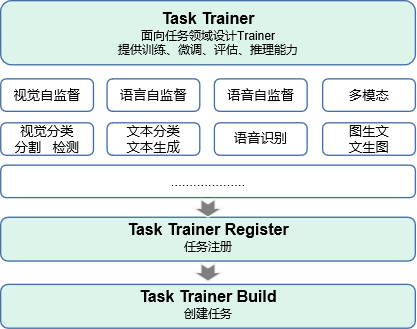
- Task Trainer 结构
Task Trainer开发依赖于MindFormers套件中的注册机制,方便开发者使用MindFormers套件提供的各个模块快速完成整网的搭建,各个模块之间可以做到有效的解耦。
- Task Trainer 启动

**脚本启动**
MindFormers套件提供了run_mindformer.py脚本,为MindFormers套件中所有的任务提供了统一的启动接口,其中集成了任务的训练、微调、评估、推理4大流程的快捷启动方式和AICC平台文件交互能力。
- 启动脚本:[run_mindformers.py](https://gitee.com/mindspore/mindformers/blob/dev/run_mindformer.py)
- VIT模型使用示例:用户可直接修改对应配置文件`configs`的yaml配置参数,也可直接使用提供的便捷命令完成参数修改,如下:
```shell
# vit 模型训练
python run_mindformer.py \
--config configs/vit/run_vit_base_p16_100ep.yaml \
--train_dataset_dir ~/data/imagenet-1k/train \
--run_status train \
--device_id 0
# 自动下载mae预训练权重,微调vit
python run_mindformer.py \
--config configs/vit/run_vit_base_p16_100ep.yaml \
--train_dataset_dir ~/data/imagenet-1k/train \
--run_status finetune \
--device_id 0 \
--load_chenckpoint mae_vit_base_p16 # 支持套件已集成的预训练模型关键词,实现权重自动加载
# profile 性能分析
python run_mindformer.py \
--config configs/vit/run_vit_base_p16_100ep.yaml \
--train_dataset_dir ~/data/imagenet-1k/train \
--run_status train \
--device_id 0 \
--profile True
# 自动下载已集成的权重进行评估
python run_mindformer.py \
--config configs/vit/run_vit_base_p16_100ep.yaml \
--eval_dataset_dir ~/data/imagenet-1k/val \
--run_status eval \
--device_id 0
# 自动下载已集成的权重进行推理
python run_mindformer.py \
--config configs/vit/run_vit_base_p16_100ep.yaml \
--predict_data ~/predict_images/flower.jpg \
--run_status predict \
--device_id 0
```
**Trainer 启动**
MindFormers套件为用户在pip安装mindformers之后可以有效的使用已集成的任务进行使用和开发,提供了Trainer易用性的高阶接口。
- Trainer 接口代码:[Trainer](https://gitee.com/mindspore/mindformers/blob/dev/mindformers/trainer/trainer.py)
- VIT模型使用示例: 用户可按照MindFormers `docs/model_cards/vit.md`使用教程提前下载好相应数据集[ImageNet1K数据集下载](https://gitee.com/mindspore/mindformers/blob/dev/docs/model_cards/vit.md#%E6%95%B0%E6%8D%AE%E9%9B%86%E5%87%86%E5%A4%87)
```python
from mindformers.trainer import Trainer
from mindformers.tools.image_tools import load_image
# 初始化任务
vit_trainer = Trainer(
task='image_classification',
model='vit_base_p16',
train_dataset="imageNet-1k/train",
eval_dataset="imageNet-1k/val")
vit_trainer.train() # 开启训练
vit_trainer.evaluate() # 开启评估
img = load_image("https://ascend-repo-modelzoo.obs.cn-east-2.myhuaweicloud.com/XFormer_for_mindspore/clip/sunflower.png")
predict_result = vit_trainer.predict(input_data=img, top_k=3) # 开启推理
```
**Task Trainer**
**MindFormers 任务支持情况一览表:**
| 任务 | 支持模型 | 运行模式 |
| :----------------------------------------------------------: | ------------------------------------------------------------ | ------------------------------ |
| fill_mask | bert_base_uncased | train |
| [text_generation](https://gitee.com/mindspore/mindformers/blob/dev/docs/task_cards/text_generation.md) | gpt2
gpt2_13b
gpt2_52b
pangualpha_2_6_b
pangualpha_13b
glm_6b
glm_6b_lora
llama_7b
llama_13b
llama_65b
llama_7b_lora
bloom_560m
bloom_7.1b
bloom_65b
bloom_176b | train、finetune、eval、predict |
| [text_classification](https://gitee.com/mindspore/mindformers/blob/dev/docs/task_cards/text_classification.md) | txtcls_bert_base_uncased
txtcls_bert_base_uncased_mnli | finetune、eval、predict |
| [token_classification](https://gitee.com/mindspore/mindformers/blob/dev/docs/task_cards/token_classification.md) | tokcls_bert_base_chinese
tokcls_bert_base_chinese_cluener | finetune、eval、predict |
| [question_answering](https://gitee.com/mindspore/mindformers/blob/dev/docs/task_cards/question_answering.md) | qa_bert_base_uncased
qa_bert_base_chinese_uncased | finetune、eval、predict |
| translation | t5_small | train、finetune、predict |
| image_masked_modeling | mae_vit_base_p16 | train、predict |
| [image_classification](https://gitee.com/mindspore/mindformers/blob/dev/docs/task_cards/image_classification.md) | vit_base_p16
swin_base_p4w7 | train、finetune、eval、predict |
| [contrastive_language_image_pretrain](https://gitee.com/mindspore/mindformers/blob/dev/docs/task_cards/contrastive_language_image_pretrain.md) | clip_vit_b_32
clip_vit_b_16
clip_vit_l_14
clip_vit_l_14@336 | train |
| [zero_shot_image_classification](https://gitee.com/mindspore/mindformers/blob/dev/docs/task_cards/zero_shot_image_classification.md) | clip_vit_b_32
clip_vit_b_16
clip_vit_l_14
clip_vit_l_14@336 | eval、predict |
#### 完形填空
**任务简介**:
Fill-Mask:俗称“完形填空”,是一种基于掩码语言建模的任务,其中模型需要从句子中的一部分单词中预测被“掩盖”的单词的最可能的词汇。具体而言,BERT输入一组带有掩码的句子,其中每个掩码代表句子中的一个单词被隐藏了。模型需要通过阅读上下文来确定被隐藏的单词最有可能是什么。
**支持模型**:
- [BERT](https://gitee.com/mindspore/mindformers/blob/dev/docs/model_cards/bert.md)
脚本使用命令
```shell
# train
python run_mindformer.py --config configs/bert/run_bert_base_uncased.yaml --run_mode train \
--device_target Ascend \
--dataset_dir /your_path/wiki_data
```
Trainer接口使用命令
```python
from mindformers.trainer import Trainer
# 初始化预训练任务
trainer = Trainer(task='fill_mask',
model='bert_base_uncased',
train_dataset='/your_path/wiki_data')
trainer.train() # 开启预训练
```
#### 文本生成
**任务简介**:
文本生成:生成自然语言文本。模型根据输入的文本和上下文生成类似人类语言的新文本。该任务可以应用于各种应用程序,如聊天机器人、自动摘要、机器翻译、文章生成等。
**支持模型**:
- [GPT2](https://gitee.com/mindspore/mindformers/blob/dev/docs/model_cards/gpt2.md)
- [GLM](https://gitee.com/mindspore/mindformers/blob/dev/docs/model_cards/glm.md)
- [LLama](https://gitee.com/mindspore/mindformers/blob/dev/docs/model_cards/llama.md)
- [Bloom](https://gitee.com/mindspore/mindformers/blob/dev/docs/model_cards/bloom.md)
- [PanGuAlpha](https://gitee.com/mindspore/mindformers/blob/dev/docs/model_cards/pangualpha.md)
脚本使用命令
```shell
python run_mindformer.py --config configs/gpt2/run_gpt2.yaml \
--run_mode train \
--device_target Ascend \
--dataset_dir /your_path/wikitext-2-mindrecord
```
Trainer接口使用命令
```python
from mindformers.trainer import Trainer
# 初始化预训练任务
trainer = Trainer(task='text_generation', model='gpt2', train_dataset="your data file path")
# 方式1: 开启训练,并使用训练好的权重进行推理
trainer.train()
res = trainer.predict(predict_checkpoint=True, input_data="I love Beijing, because")
# 方式2: 从obs下载训练好的权重并进行推理
res = trainer.predict(input_data="I love Beijing, because")
```
#### 文本分类
**任务简介**:
文本分类:模型在基于文本对的微调后,可以在给定任意文本对与候选标签列表的情况下,完成对文本对关系的分类,文本对的两个文本之间以-分割。
**支持模型**:
- [BertForMultipleChoice](https://gitee.com/mindspore/mindformers/blob/dev/docs/task_cards/text_classification.md)
脚本使用命令
```shell
# finetune
python run_mindformer.py --config ./configs/txtcls/run_txtcls_bert_base_uncased.yaml --run_mode finetune --load_checkpoint txtcls_bert_base_uncased
```
```shell
# evaluate
python run_mindformer.py --config ./configs/txtcls/run_txtcls_bert_base_uncased.yaml --run_mode eval --load_checkpoint txtcls_bert_base_uncased_mnli
```
```shell
# predict
python run_mindformer.py --config ./configs/txtcls/run_txtcls_bert_base_uncased.yaml --run_mode predict --load_checkpoint txtcls_bert_base_uncased_mnli --predict_data [TEXT]
```
Trainer接口使用命令
```python
from mindformers import MindFormerBook
from mindformers.trainer import Trainer
# 显示Trainer的模型支持列表
MindFormerBook.show_trainer_support_model_list("text_classification")
# INFO - Trainer support model list for txt_classification task is:
# INFO - ['txtcls_bert_base_uncased']
# INFO - -------------------------------------
# 初始化trainer
trainer = Trainer(task='text_classification',
model='txtcls_bert_base_uncased',
train_dataset='./mnli/train',
eval_dataset='./mnli/eval')
# 测试数据,该input_data有两个测试案例,即两个文本对,单个文本对的两个文本之间用-分割
input_data = ["The new rights are nice enough-Everyone really likes the newest benefits ",
"i don't know um do you do a lot of camping-I know exactly."]
#方式1:使用现有的预训练权重进行finetune, 并使用finetune获得的权重进行eval和推理
trainer.train(resume_or_finetune_from_checkpoint="txtcls_bert_base_uncased",
do_finetune=True)
trainer.evaluate(eval_checkpoint=True)
trainer.predict(predict_checkpoint=True, input_data=input_data, top_k=1)
# 方式2: 从obs下载训练好的权重并进行eval和推理
trainer.evaluate()
# INFO - Top1 Accuracy=84.8%
trainer.predict(input_data=input_data, top_k=1)
# INFO - output result is [[{'label': 'neutral', 'score': 0.9714198708534241}],
# [{'label': 'contradiction', 'score': 0.9967639446258545}]]
```
#### 命名实体识别
**任务简介**:
命名实体识别:模型在基于命名实体识别数据集的微调后,可以在给定任意文本与候选标签列表的情况下,完成对文本中命名实体的识别。
**支持模型**:
- [BertForTokenClassification](https://gitee.com/mindspore/mindformers/blob/dev/docs/task_cards/token_classification.md)
脚本使用命令
```shell
# finetune
python run_mindformer.py --config ./configs/tokcls/run_tokcls_bert_base_chinese.yaml --run_mode finetune --load_checkpoint tokcls_bert_base_chinese
```
```shell
# evaluate
python run_mindformer.py --config ./configs/tokcls/run_tokcls_bert_base_chinese.yaml --run_mode eval --load_checkpoint tokcls_bert_base_chinese_cluener
```
```shell
# predict
python run_mindformer.py --config ./configs/tokcls/run_tokcls_bert_base_chinese.yaml --run_mode predict --load_checkpoint tokcls_bert_base_chinese_cluener --predict_data [TEXT]
```
Trainer接口使用命令
```python
from mindformers.trainer import Trainer
# 初始化trainer
trainer = Trainer(task='token_classification',
model='tokcls_bert_base_chinese',
train_dataset='./cluener/',
eval_dataset='./cluener/')
# 测试数据
input_data = ["结果上周六他们主场0:3惨败给了中游球队瓦拉多利德,近7个多月以来西甲首次输球。"]
#方式1:使用现有的预训练权重进行finetune, 并使用finetune获得的权重进行eval和推理
trainer.train(resume_or_finetune_from_checkpoint="tokcls_bert_base_chinese",
do_finetune=True)
trainer.evaluate(eval_checkpoint=True)
trainer.predict(predict_checkpoint=True, input_data=input_data)
# 方式2: 从obs下载训练好的权重并进行eval和推理
trainer.evaluate()
# INFO - Entity F1=0.7853
trainer.predict(input_data=input_data)
# INFO - output result is [[{'entity_group': 'organization', 'start': 20, 'end': 24, 'score': 0.94914, 'word': '瓦拉多利德'},
# {'entity_group': 'organization', 'start': 33, 'end': 34, 'score': 0.9496, 'word': '西甲'}]]
```
#### 问答任务
**任务简介**:
问答任务:模型在基于问答数据集的微调后,输入为上下文(context)和问题(question),模型根据上下文(context)给出相应的回答。
**支持模型**:
- [BertForQuestionAnswering](https://gitee.com/mindspore/mindformers/blob/dev/docs/task_cards/question_answering.md)
脚本使用命令
```shell
# finetune
python run_mindformer.py --config ./configs/qa/run_qa_bert_base_uncased.yaml --run_mode finetune --load_checkpoint qa_bert_base_uncased
```
```shell
# evaluate
python run_mindformer.py --config ./configs/qa/run_qa_bert_base_uncased.yaml --run_mode eval --load_checkpoint qa_bert_base_uncased_squad
```
```shell
# predict
python run_mindformer.py --config ./configs/qa/run_qa_bert_base_uncased.yaml --run_mode predict --load_checkpoint qa_bert_base_uncased_squad --predict_data [TEXT]
```
Trainer接口使用命令
```python
from mindformers.trainer import Trainer
# 初始化trainer
trainer = Trainer(task='question_answering',
model='qa_bert_base_uncased',
train_dataset='./squad/',
eval_dataset='./squad/')
#方式1:使用现有的预训练权重进行finetune, 并使用finetune获得的权重进行eval和推理
trainer.train(resume_or_finetune_from_checkpoint="qa_bert_base_uncased",
do_finetune=True)
trainer.evaluate(eval_checkpoint=True)
# 测试数据,测试数据分为context和question两部分,两者以 “-” 分隔
input_data = ["My name is Wolfgang and I live in Berlin - Where do I live?"]
trainer.predict(predict_checkpoint=True, input_data=input_data)
# 方式2: 从obs下载训练好的权重并进行eval和推理
trainer.evaluate()
# INFO - QA Metric = {'QA Metric': {'exact_match': 80.74739829706716, 'f1': 88.33552874684968}}
# 测试数据,测试数据分为context和question两部分,两者以 “-” 分隔
input_data = ["My name is Wolfgang and I live in Berlin - Where do I live?"]
trainer.predict(input_data=input_data)
# INFO - output result is [{'text': 'Berlin', 'score': 0.9941, 'start': 34, 'end': 40}]
```
#### 翻译
**任务简介**:
翻译:将一种语言翻译成另一种语言,即进行机器翻译。模型在输入一段文本后,输出对应的翻译结果。例如,将英语句子翻译成法语、汉语、德语等其他语言。
**支持模型**:
- [T5](https://gitee.com/mindspore/mindformers/blob/dev/docs/model_cards/t5.md)
脚本使用命令
```shell
python run_mindformer.py --config configs/t5/run_t5_tiny_on_wmt16.yaml --run_mode train \
--device_target Ascend \
--dataset_dir /your_path/wmt_en_ro
```
Trainer接口使用命令
```python
from mindformers.trainer import Trainer
# 初始化预训练任务
trainer = Trainer(task='translation', model='t5_small', train_dataset="your data file path")
# 方式1: 开启训练,并使用训练好的权重进行推理
trainer.train()
res = trainer.predict(predict_checkpoint=True, input_data="translate the English to Romanian: a good boy!")
print(res)
#[{'translation_text': ['un băiat bun!']}]
# 方式2: 从obs下载训练好的权重并进行推理
res = trainer.predict(input_data="translate the English to Romanian: a good boy!")
print(res)
#[{'translation_text': ['un băiat bun!']}]
```
#### 图像掩码建模
**任务简介**:
图像掩码建模:通过遮蔽图像中的某些部分来预测被遮蔽的部分。这个任务通常涉及在图像中指定一个区域,并将该区域遮蔽,然后使用遮蔽的图像作为输入,从未遮蔽的图像区域中预测遮蔽的部分。这种任务在计算机视觉中被广泛应用,例如,在图像修复和图像合成中,可以使用遮蔽建模来修复或合成图像中的缺失或不完整部分。
**支持模型**:
- [MAE](https://gitee.com/mindspore/mindformers/blob/dev/docs/model_cards/mae.md)
脚本使用命令
```shell
# pretrain
python run_mindformer.py --config ./configs/mae/run_mae_vit_base_p16.yaml --run_mode train
```
Trainer接口使用命令
```python
from mindformers.trainer import Trainer
# 初始化任务
mae_trainer = Trainer(
task='masked_image_modeling',
model='mae_vit_base_p16',
train_dataset="imageNet-1k/train")
mae_trainer.train() # 开启训练
```
#### 图像分类
**任务简介**:
图像分类:将输入的图像识别为属于哪一类别。例如,输入一张狗的图片,模型可以识别出这是一只狗,并将其分类为狗这一类别。这种图像分类任务可用于许多应用,如智能相册、图像搜索、人脸识别、安防监控等。
**支持模型**:
- [VIT](https://gitee.com/mindspore/mindformers/blob/dev/docs/model_cards/vit.md)
脚本使用命令
```shell
# pretrain
python run_mindformer.py --config ./configs/vit/run_vit_base_p16_224_100ep.yaml --run_mode train
```
```shell
# evaluate
python run_mindformer.py --config ./configs/vit/run_vit_base_p16_224_100ep.yaml --run_mode eval --dataset_dir [DATASET_PATH]
```
```shell
# predict
python run_mindformer.py --config ./configs/vit/run_vit_base_p16_224_100ep.yaml --run_mode predict --predict_data [PATH_TO_IMAGE]
```
Trainer接口使用命令
```python
from mindformers.trainer import Trainer
from mindformers.tools.image_tools import load_image
# 初始化任务
vit_trainer = Trainer(
task='image_classification',
model='vit_base_p16',
train_dataset="imageNet-1k/train",
eval_dataset="imageNet-1k/val")
img = load_image("https://ascend-repo-modelzoo.obs.cn-east-2.myhuaweicloud.com/XFormer_for_mindspore/clip/sunflower.png")
# 方式1:使用现有的预训练权重进行finetune, 并使用finetune获得的权重进行eval和推理
vit_trainer.train(resume_or_finetune_from_checkpoint="mae_vit_base_p16", do_finetune=True)
vit_trainer.evaluate(eval_checkpoint=True)
predict_result = vit_trainer.predict(predict_checkpoint=True, input_data=img, top_k=3)
print(predict_result)
# 方式2: 重头开始训练,并使用训练好的权重进行eval和推理
vit_trainer.train()
vit_trainer.evaluate(eval_checkpoint=True)
predict_result = vit_trainer.predict(predict_checkpoint=True, input_data=img, top_k=3)
print(predict_result)
# 方式3: 从obs下载训练好的权重并进行eval和推理
vit_trainer.evaluate()
predict_result = vit_trainer.predict(input_data=img, top_k=3)
print(predict_result)
```
- [Swin](https://gitee.com/mindspore/mindformers/blob/dev/docs/model_cards/swin.md)
脚本使用命令
```shell
# pretrain
python run_mindformer.py --config ./configs/swin/run_swin_base_p4w7_224_100ep.yaml --run_mode train --dataset_dir [DATASET_PATH]
```
```shell
# evaluate
python run_mindformer.py --config ./configs/swin/run_swin_base_p4w7_224_100ep.yaml --run_mode eval --dataset_dir [DATASET_PATH]
```
```shell
# predict
python run_mindformer.py --config ./configs/swin/run_swin_base_p4w7_224_100ep.yaml --run_mode predict --predict_data [PATH_TO_IMAGE]
```
Trainer接口使用命令
```python
from mindformers.trainer import Trainer
from mindformers.tools.image_tools import load_image
# 初始化任务
swin_trainer = Trainer(
task='image_classification',
model='swin_base_p4w7',
train_dataset="imageNet-1k/train",
eval_dataset="imageNet-1k/val")
img = load_image("https://ascend-repo-modelzoo.obs.cn-east-2."
"myhuaweicloud.com/XFormer_for_mindspore/clip/sunflower.png")
# 方式1:开启训练,并使用训练好的权重进行eval和推理
swin_trainer.train()
swin_trainer.evaluate(eval_checkpoint=True)
predict_result = swin_trainer.predict(predict_checkpoint=True, input_data=img, top_k=3)
print(predict_result)
# 方式2: 从obs下载训练好的权重并进行eval和推理
swin_trainer.evaluate() # 下载权重进行评估
predict_result = swin_trainer.predict(input_data=img, top_k=3) # 下载权重进行推理
print(predict_result)
# 输出
# - mindformers - INFO - output result is: [[{'score': 0.89573187, 'label': 'daisy'},
# {'score': 0.005366202, 'label': 'bee'}, {'score': 0.0013296203, 'label': 'fly'}]]
```
#### 语言图像对比预训练
**任务简介**:
语言图像对比预训练:对模型进行图文对比学习,增强模型对文本图片的匹配度认识能力,预训练完的模型可用于零样本图像分类等下游任务
**支持模型**:
- [CLIP](https://gitee.com/mindspore/mindformers/blob/dev/docs/model_cards/clip.md)
Trainer接口使用命令
```python
from mindformers import MindFormerBook
from mindformers.trainer import Trainer
# 显示Trainer的模型支持列表
MindFormerBook.show_trainer_support_model_list("contrastive_language_image_pretrain")
# INFO - Trainer support model list for contrastive_language_image_pretrain task is:
# INFO - ['clip_vit_b_32', 'clip_vit_b_16', 'clip_vit_l_14', 'clip_vit_l_14@336']
# INFO - -------------------------------------
# 初始化trainer
trainer = Trainer(task='contrastive_language_image_pretrain',
model='clip_vit_b_32',
train_dataset='./Flickr8k'
)
trainer.train()
```
#### 零样本图像分类
**任务简介**:
零样本图像分类:模型在基于图文对的预训练后,可以在给定任意图片与候选标签列表的情况下,完成对图像的分类,而无需任何微调。
**支持模型**:
- [CLIP](https://gitee.com/mindspore/mindformers/blob/dev/docs/model_cards/clip.md)
Trainer接口使用命令
```python
from mindformers import MindFormerBook
from mindformers.trainer import Trainer
from mindformers.tools.image_tools import load_image
# 显示Trainer的模型支持列表
MindFormerBook.show_trainer_support_model_list("zero_shot_image_classification")
# INFO - Trainer support model list for zero_shot_image_classification task is:
# INFO - ['clip_vit_b_32', 'clip_vit_b_16', 'clip_vit_l_14', 'clip_vit_l_14@336']
# INFO - -------------------------------------
# 初始化trainer
trainer = Trainer(task='zero_shot_image_classification',
model='clip_vit_b_32',
eval_dataset='cifar-100-python'
)
img = load_image("https://ascend-repo-modelzoo.obs.cn-east-2."
"myhuaweicloud.com/XFormer_for_mindspore/clip/sunflower.png")
trainer.evaluate() #下载权重进行评估
# INFO - Top1 Accuracy=57.24%
trainer.predict(input_data=img) #下载权重进行推理
# INFO - output result is saved at ./results.txt
```